You send someone a photo straight off your iPhone and it arrives as a file called IMG_4032.HEIC. On their Windows laptop it won’t open, or it shows up as a grey box, or Photos offers to sell them a codec first. The picture itself is fine. It’s just wearing a format Apple chose that a lot of the world still can’t read.
The cure is to turn it into a JPG, which opens on basically everything made this century. Here’s how to convert HEIC to JPG free on Windows, right in your browser, without installing a thing. The same steps work on a Mac or on the phone itself.
I built ToolsTray’s image converter, so that’s what I’ll use here. I’ll also be straight about the one thing that gets a little worse when you do this, because most guides skip it.
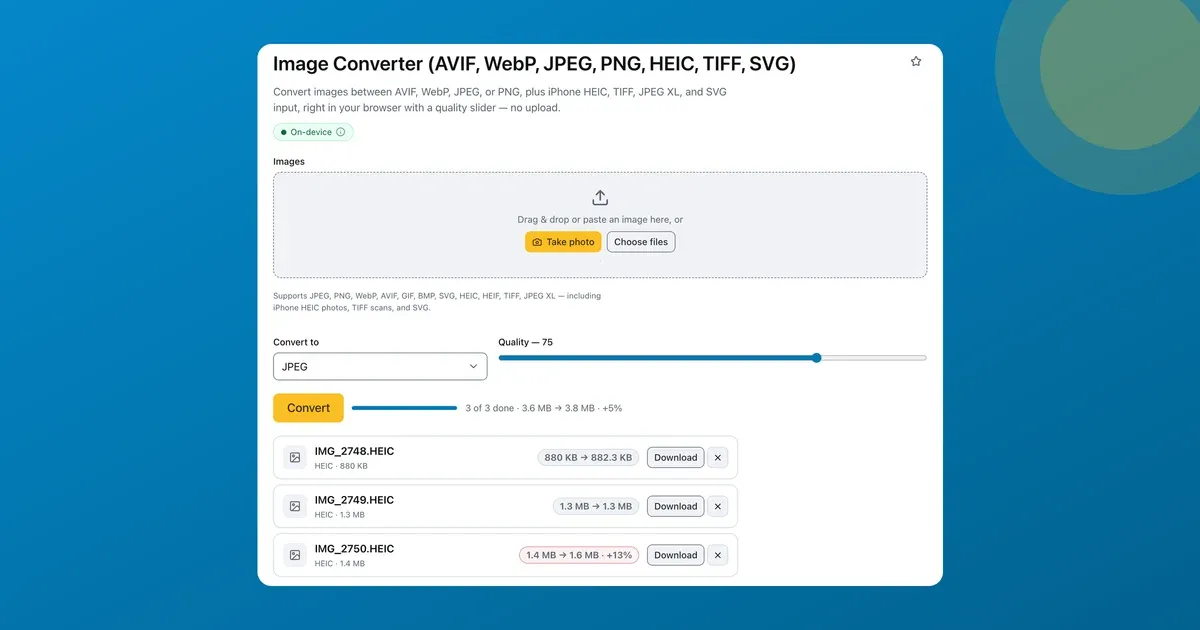
Drop the HEICs, set Convert to JPEG
The converter reads Apple’s HEIC and HEIF formats inside the page, so the whole job is short.
- Drop your .HEIC files onto the converter. Choose files takes the whole lot at once, and pasting straight from the clipboard works too. Each photo lands in a list with its name and size the moment you pick it, with an ✕ to pull one back out.
- Set Convert to → JPEG. Leave quality around 75 for a result you won’t be able to tell apart from the original, or push it higher if the photo is headed for print.
- Press Convert and download. Grab one file, or Download all (.zip) if you dropped a batch.

Drop the HEIC, pick JPEG, download. The list shows each file’s size before and after.
You won’t hit a sign-up form, an email gate, or an “upgrade to convert more than three photos” screen on the way.
Fair’s fair: on a Mac you may not need a website at all. Preview opens HEIC, and File → Export saves a JPEG. The converter earns its keep on Windows, on the phone itself, or when it’s two hundred photos instead of two.
Why your phone shoots HEIC in the first place
HEIC is Apple’s wrapper around HEIF, a modern format that borrows its compression from high-efficiency video. The benefit is genuine: a HEIC photo is usually about half the size of the same shot saved as JPG, at roughly the same quality. That’s a good deal while the file lives on your phone. It stops being a good deal the moment the photo leaves Apple’s world. Windows needs an extension, plenty of upload forms reject it outright, and older photo software just shrugs.
So there’s an honest trade, and the converter shows it to you plainly. When I ran three iPhone HEICs through it as JPEG, the batch went from 3.6 MB to 3.8 MB, about 5% bigger, and the largest single jump was +13%. JPG is simply the less efficient format; you’re paying a little size for a file that opens everywhere. For email, a job application, a print order, or any form that says “JPEG or PNG only,” that’s the trade you want.
Nothing leaves your computer
The whole conversion runs on your device, inside the browser tab. Your photos are never sent to a server. That matters more than it sounds. CloudConvert and iLoveIMG will both do this job fine, but they work by hauling your images up to their servers first, and holiday photos or a snapshot of your passport aren’t things you want sitting in a stranger’s upload folder. Here the file stays put. You can switch off your wifi after the page loads and it still converts.
What a flat JPG can’t keep
- Live Photos lose the motion. A HEIC Live Photo becomes a single still JPG. The little video half can’t come along, because JPG has nowhere to store it. Every HEIC-to-JPG tool has this limit, this one included.
- Depth and edits don’t survive. Portrait-mode depth data and any non-destructive edits baked into the HEIC won’t carry into a flat JPG. You get the picture as it looks now. The editable original stays back in the HEIC file.
- Big batches take a moment. A few hundred photos convert one after another in the tab. It’s quick, but it’s your laptop doing the work rather than a data centre, so give it a few seconds.
If you’d rather make the photos smaller than make them more compatible, compress them instead. Same in-browser idea, aimed at file size. And before any of them go public, it’s worth checking what location data they still carry.