
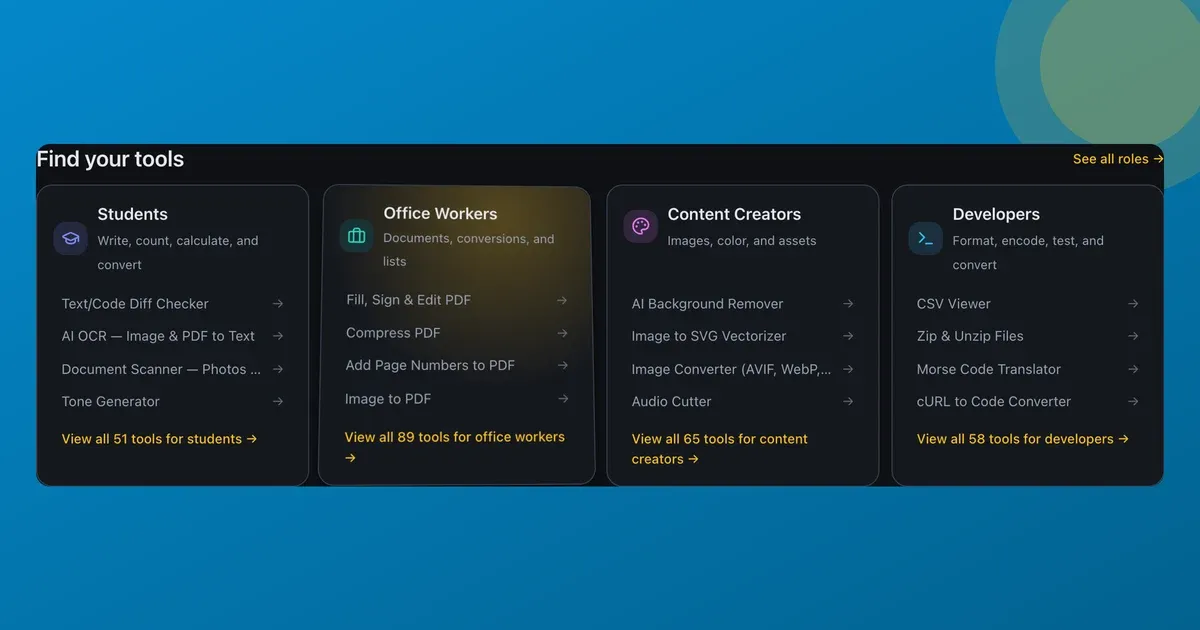
A grid of tool cards looked fine. It also looked dead. A wall of flat rectangles you scrolled past without ever touching.
So I gave the cards on ToolsTray two small hover effects: a spotlight that glows under the cursor, and a tilt that leans the card toward your pointer like a physical tile. Together they came to about forty lines and one pointer listener per card, and for a few months they were most of the reason the homepage felt alive instead of static.
Here’s exactly how they work. And how I kept them from punishing anyone who can’t, or doesn’t want to, see them.
The spotlight is just two CSS variables
The glow is a radial gradient in CSS rather than an image or a canvas. It reads its position from two custom properties, --spot-x and --spot-y. JavaScript’s only job is to keep those two numbers in sync with the cursor:
const rect = el.getBoundingClientRect();
const px = pointer.clientX - rect.left;
const py = pointer.clientY - rect.top;
el.style.setProperty("--spot-x", `${px}px`);
el.style.setProperty("--spot-y", `${py}px`);
The card’s CSS does the rest with a radial-gradient(... at var(--spot-x) var(--spot-y) ...) that brightens on hover. Moving the actual paint into CSS keeps it on the compositor and keeps the JavaScript cheap.
The tilt is a rotation toward the cursor
Tilt maps the pointer’s position to a 3D rotation. The further the cursor sits from the centre, the more the card leans, capped so it never looks seasick.
const TILT_DEG = 6;
const rx = (0.5 - py / rect.height) * TILT_DEG * 2; // rotateX
const ry = (px / rect.width - 0.5) * TILT_DEG * 2;  // rotateY
el.style.transform =
  `perspective(600px) rotateX(${rx}deg) rotateY(${ry}deg) translateY(-3px)`;
Six degrees was the magic number. I started at twelve and it looked like a gimmick; at three you couldn’t tell it was on. The little translateY(-3px) lift sells the idea that the card has left the page.
Throttle to one update per frame
pointermove fires far more often than the screen refreshes, and setting transform on every event is how you get jank. So a move just stashes the latest event and asks for one animation frame; the frame does the maths once and clears the flag:
const onMove = (event) => {
  last = event;
  if (frame === 0) frame = requestAnimationFrame(apply);
};
No matter how fast you wave the mouse, each card updates at most once per repaint.
The bug that taught me something: don’t transition the transform
The first version smeared. On hover, the card’s resting transition: transform ... tried to animate the tilt toward every new cursor position, so it always lagged a few pixels behind. The card looked like it was wading through syrup.
The fix is to drop transform from the transition while the cursor is inside, so the tilt tracks instantly, then put a springy transition back on the way out so the card settles instead of snapping.
Gate it hard, or it’s an accessibility bug
This is the part I care about most. Cursor-following motion is delightful right up until it makes someone queasy, or fires on a touch tap where there’s no cursor at all. So the whole thing sits behind two media queries, checked once before anything is wired:
const reduce = matchMedia("(prefers-reduced-motion: reduce)").matches;
const hover  = matchMedia("(hover: hover)").matches;
if (!reduce && hover) { /* wire the cards */ }
Ask your OS for reduced motion, or use a touchscreen with no real pointer, and none of it runs. The cards stay perfectly usable. They just don’t dance. It’s opt-in per element, too: a card requests what it wants with data-tilt and data-spotlight attributes, so I could be playful on the homepage and calm on a tool page.
Would I add this to every site? No.
It’s candy. On a blog or a checkout flow I’d leave it out, because there it’s motion for motion’s sake. But on a tools homepage where the cards are the product, half a second of delight as you mouse across them earns its forty lines. And gating it means it costs the people who don’t want it exactly nothing.
You won’t find it on ToolsTray any more, though. When I redrew the site I gave every hover the same small lift, and the tilt and the glow went out with the old cards. One way of answering the pointer across the whole site beat a special trick on one page. The code above still drops into any grid of cards. And the cards it used to sit on still lead to the same tools, like the PDF compressor and the background remover, from the homepage and the full list.
Read next
 Developers
How I made a static site installable and offline
A static tool site with no backend, turned into an installable app that works offline without breaking ads, analytics, or consent. The service worker, and the scars.
 Developers
How to tell if an online JWT decoder is sending your token to a server
Plenty of 'JWT decoder' sites quietly POST your token to their backend. Here's the 10-second check I use, and why it's worth decoding locally instead.
 Developers
WebAssembly turned my static site into a zero-backend app platform
I shipped a site full of real tools, image compression among them, as static files with no backend. WebAssembly does the work in the browser. Here's how.