
I had a fifteen-second voice memo from a standup and needed it as text I could paste into notes. The web is full of tools for that. Most want the recording uploaded to their server and an account made first, and the paywall lands at the twenty-minute mark.
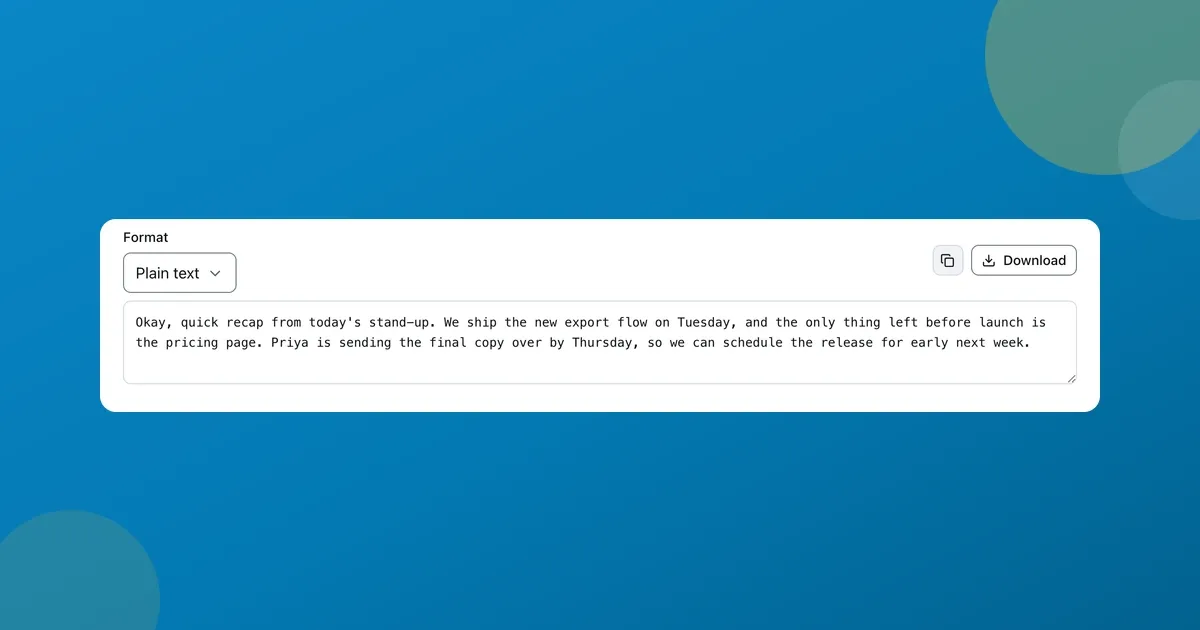
You can transcribe audio to text free without any of that. I built ToolsTray’s transcription tool to run a real speech model right in the tab. The recording stays on your machine, nobody has to make an account, and there is no length paywall. Here’s the actual output from that memo, small mistakes and all.
Transcribing the memo, start to finish
The whole run looks like this.
- Drop an audio file, or a video, into the transcriber. MP3, WAV, M4A, and more all work.
- Pick a model. Fast is English-only and quick; Balanced and the larger models handle other languages and tougher audio.
- Press Transcribe. The first run downloads the model once; after that it works offline. When it’s done, copy the text or download it.

The finished transcript of my fifteen-second memo. It even got the name “Priya” and both weekdays right.
I ran it on the Balanced model, and it transcribed the whole thing in a few seconds. It caught the proper noun and the dates, which is usually where transcription slips.
To be honest about the one mistake: I said “we shipped the export flow” and it wrote “we ship.” Speech models drop or bend a word here and there, especially past-tense endings and anything mumbled. It’s genuinely good. Read it back before you rely on it, the same as any transcript.
Timestamps and subtitle export
The reason I keep coming back to this rather than a generic paste-box is the export. Switch the Format to SRT or WebVTT and every line comes out with real timecodes, ready to drop onto a video as captions.
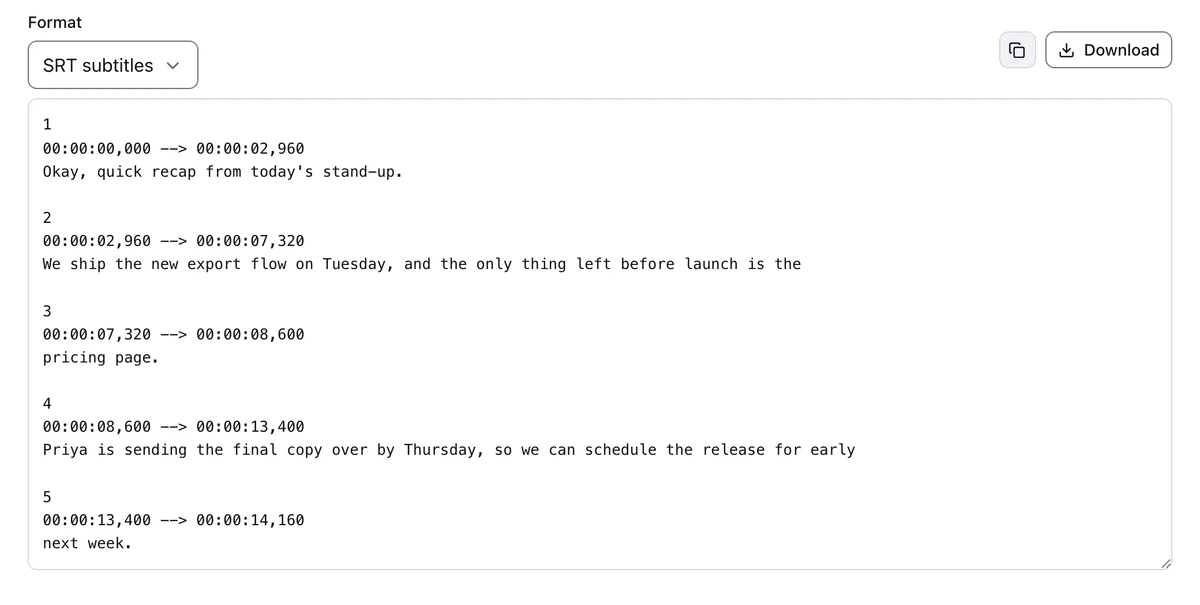
The same audio as SRT. Numbered cues, each with a real start and end timecode. Plain text, SRT, and WebVTT are one dropdown apart.
If you already have a subtitle file that just needs its timing nudged, the subtitle converter shifts and resyncs SRT and VTT without re-transcribing.
Picking a model: fast versus accurate
The model dropdown is the one real decision. Faster models are smaller and start sooner; the larger ones are more accurate and speak more languages, at the cost of a bigger one-time download.
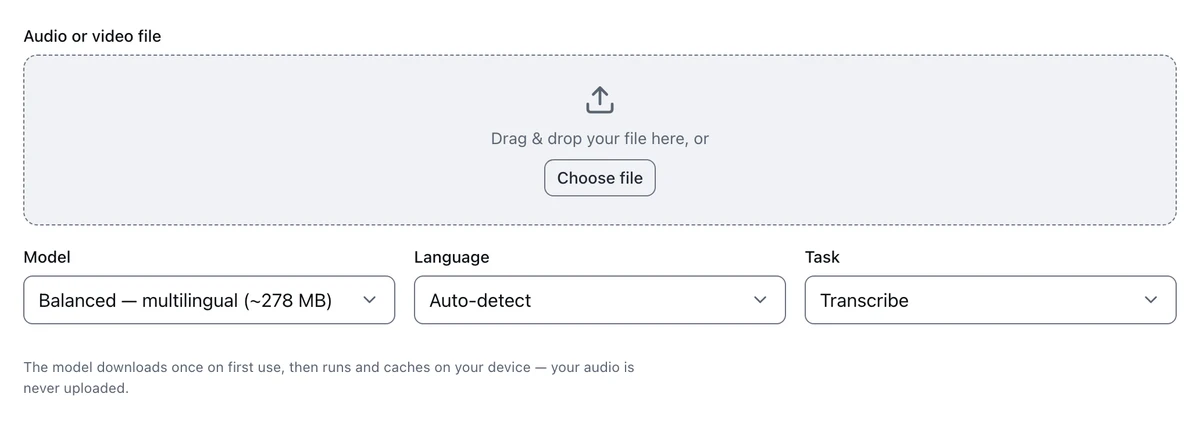
Fast is English-only; the larger models add languages. Task switches between transcribe and translate-to-English.
Why on-device matters here specifically
The things people transcribe are rarely neutral: a lecture you paid for, a client call, a doctor’s voice note, an interview under embargo. All of it is processed inside the tab on your own machine, and the audio is never uploaded, to me or anyone. Most free web transcribers work by sending your recording to their servers first. Here there’s no server in the loop, and it keeps working on a plane once the model’s cached.
The catches
- Expect the odd wrong word. Fast speech, crosstalk, and heavy accents all trip it up now and then. Skim the transcript before it goes anywhere that matters.
- No speaker labels. You get one clean stream of text and timecodes. For a two-person interview you’ll add the names yourself.
- The first run downloads a model. That’s a one-time cost per model, hundreds of MB for the larger ones. It’s cached afterwards, so later runs are instant and offline.
- Long files take proportionally longer. A fifteen-second memo is instant; a ninety-minute lecture is a real wait, especially on the bigger models.
If your recording is a video and you want captions burned in rather than a text file, add subtitles to a video does that end to end. And the text-to-speech tool goes the other way, turning written text into natural speech.
AI Audio Transcription
Audio transcription with Whisper. Drop in a recording and get editable text, plus SRT and WebVTT carrying timestamps, from any of four model sizes.
Read next
 Students
A free Splitwise alternative with no app and no account
A free Splitwise alternative that runs in your browser: log who paid what, split a restaurant bill by item, and settle the whole trip in the fewest payments.
 Office Workers
Scan documents to PDF free without installing an app
Scan documents to PDF free with your phone or laptop: auto edges, straightening, a clean-up eraser, searchable text. All in the browser, nothing installed or uploaded.
 Students
Extract text from a scanned PDF with a neural OCR engine
Extract text from a scanned PDF or a photo of a page, free. Choose Classic or the neural Sharp engine, then copy the words or take back a searchable PDF.