
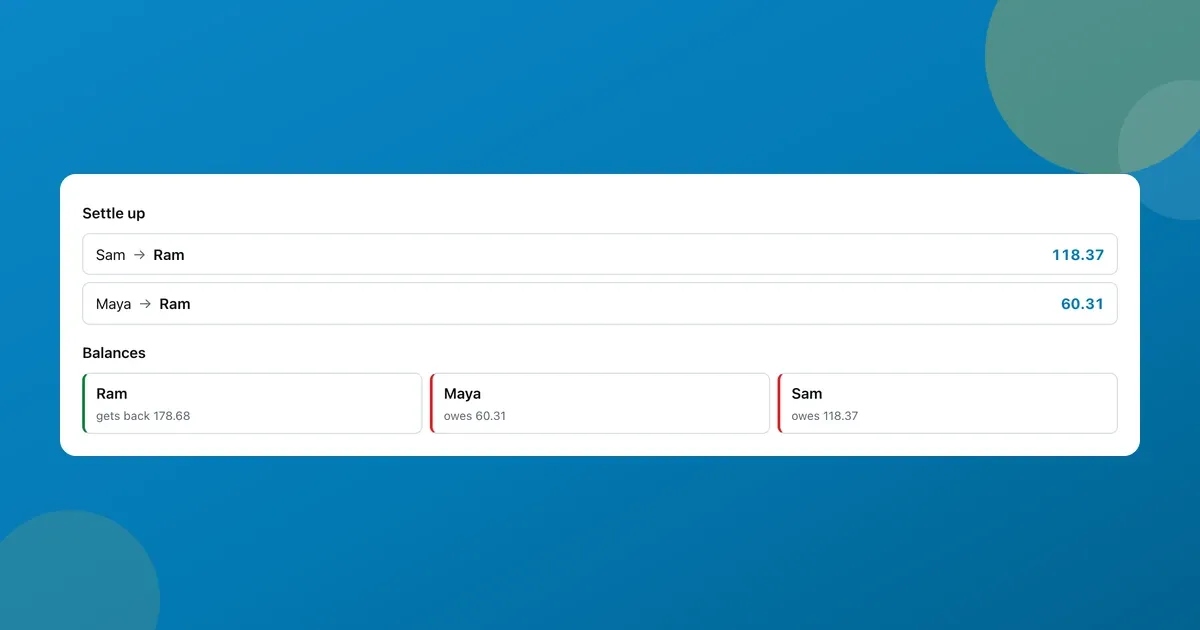
Three of us drove up for a weekend. I paid for the cabin, Sam grabbed the groceries, Maya covered petrol and then most of a long dinner. By Sunday night we had four expenses, eight separate “you owe me” debts floating around, and the usual stalemate where everyone agrees to sort it out later and nobody does.
The normal advice is Splitwise, and it’s a good app. But it wanted all three of us to install something and make accounts for one weekend. So I used the bill splitter I built on ToolsTray instead, a free Splitwise alternative that runs in an ordinary browser tab. It does the same arithmetic and nobody has to make an account. Below is the actual trip, numbers and all.
Prefer to watch? The whole settle-up in under ten seconds:
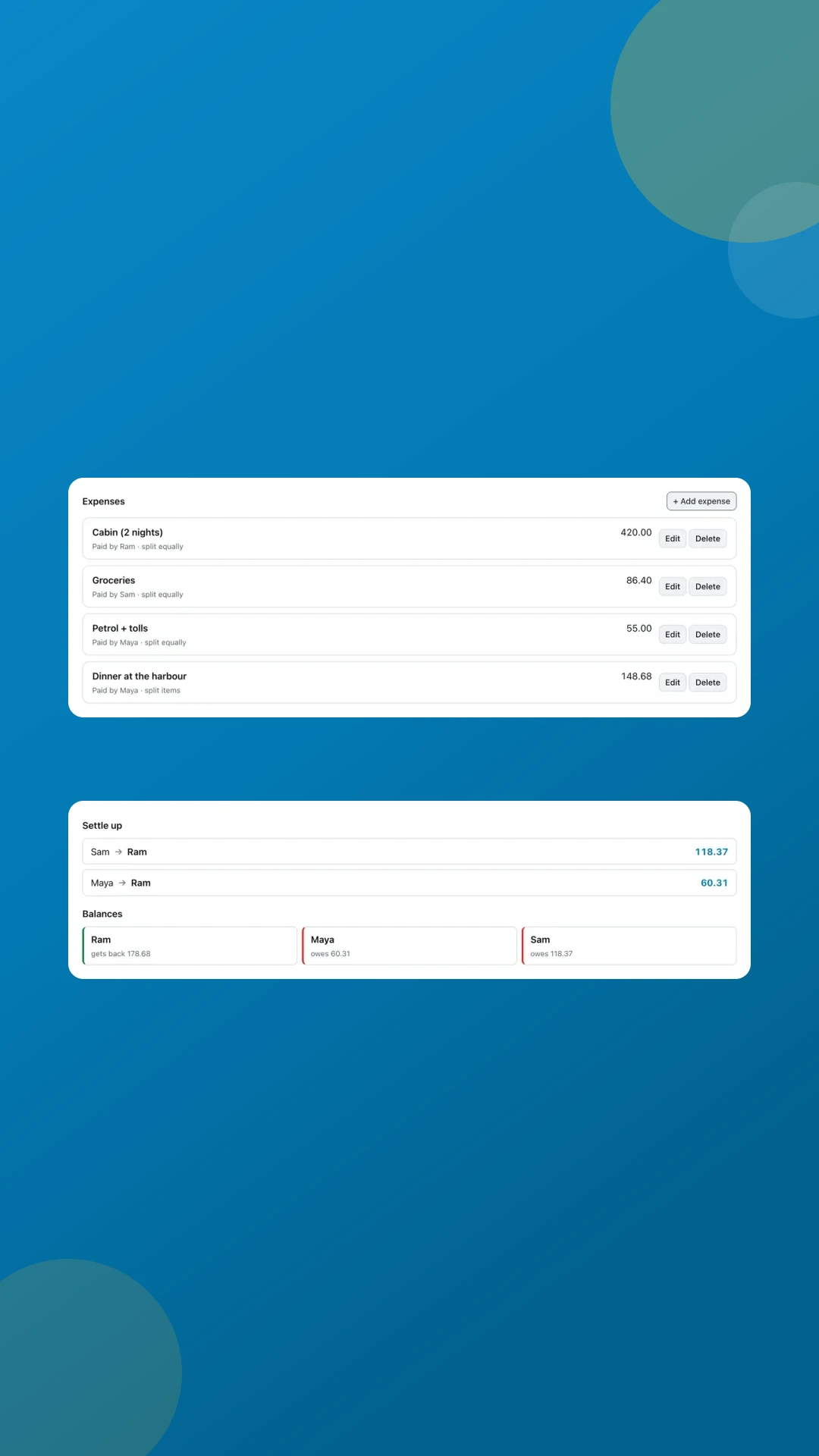
Log the weekend in Group & settle up
- Open the bill splitter and switch to Group & settle up. Name the people once. First names are enough.
- Add each expense with who actually paid it, and choose how it splits: equally, by shares, by exact amounts, or by itemizing the receipt.
- Read the Settle up list. It nets everything off and tells you the shortest set of payments that clears the whole group.
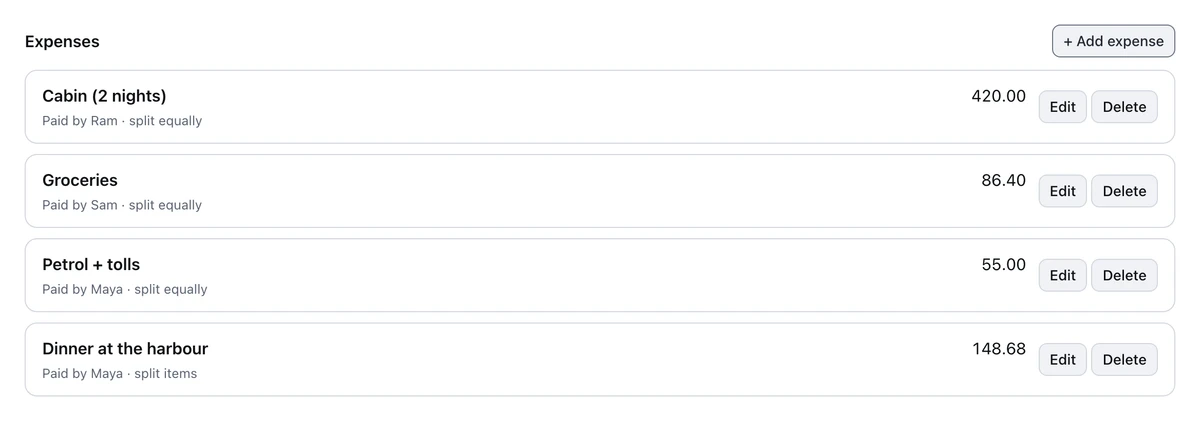
Our four expenses. Each row remembers who paid and how it was split. The dinner is itemized.
Eight IOUs became two payments
That’s the part worth the tab. Across four expenses, each person owed the payer something. Eight little debts in total. Settled naively, that’s eight bank transfers for a weekend away.
The tool nets each person’s total paid against their total owed, then matches the biggest debtor to the biggest creditor until every balance is zero. Our trip came to $710.08, and it collapsed to two payments: Sam sent me $118.37, Maya sent me $60.31, and everyone was square.
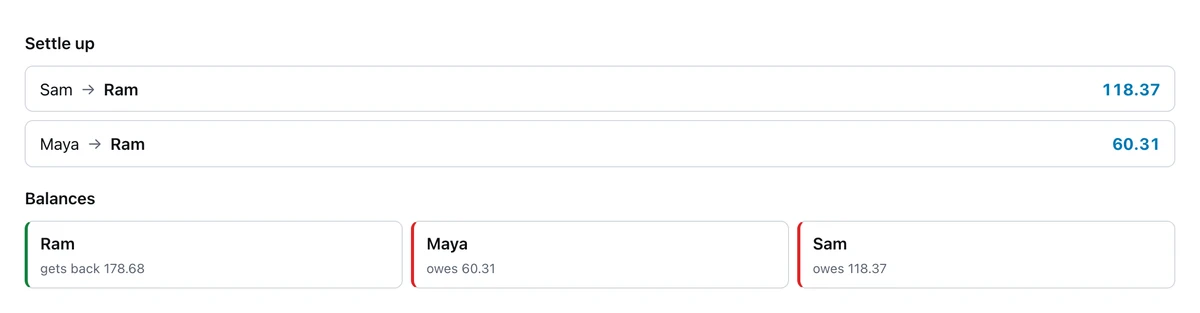
Two transfers instead of eight. The balances underneath show how each person got there.
Copy summary drops that as plain text into the group chat, which is what actually got us paid. Copy share link hands over the entire split as a URL. The whole ledger is encoded in the link itself, and whoever opens it sees the same numbers without signing up for anything.
Itemize when someone just had the salad
Splitting a restaurant bill evenly is fine until it isn’t. Our harbour dinner was $148.68. Maya had the ribeye, I had pasta, we shared a bottle of red, and Sam had a $14 garden salad and water. An even three-way split would have charged Sam $49.56 for that salad.
So I itemized: type each line, tap the people who shared it. Tax and tip then follow what everyone actually ordered instead of being sliced evenly, so Sam’s share of the $9.44 tax and $21.24 tip tracks his $14 rather than a third of the table.
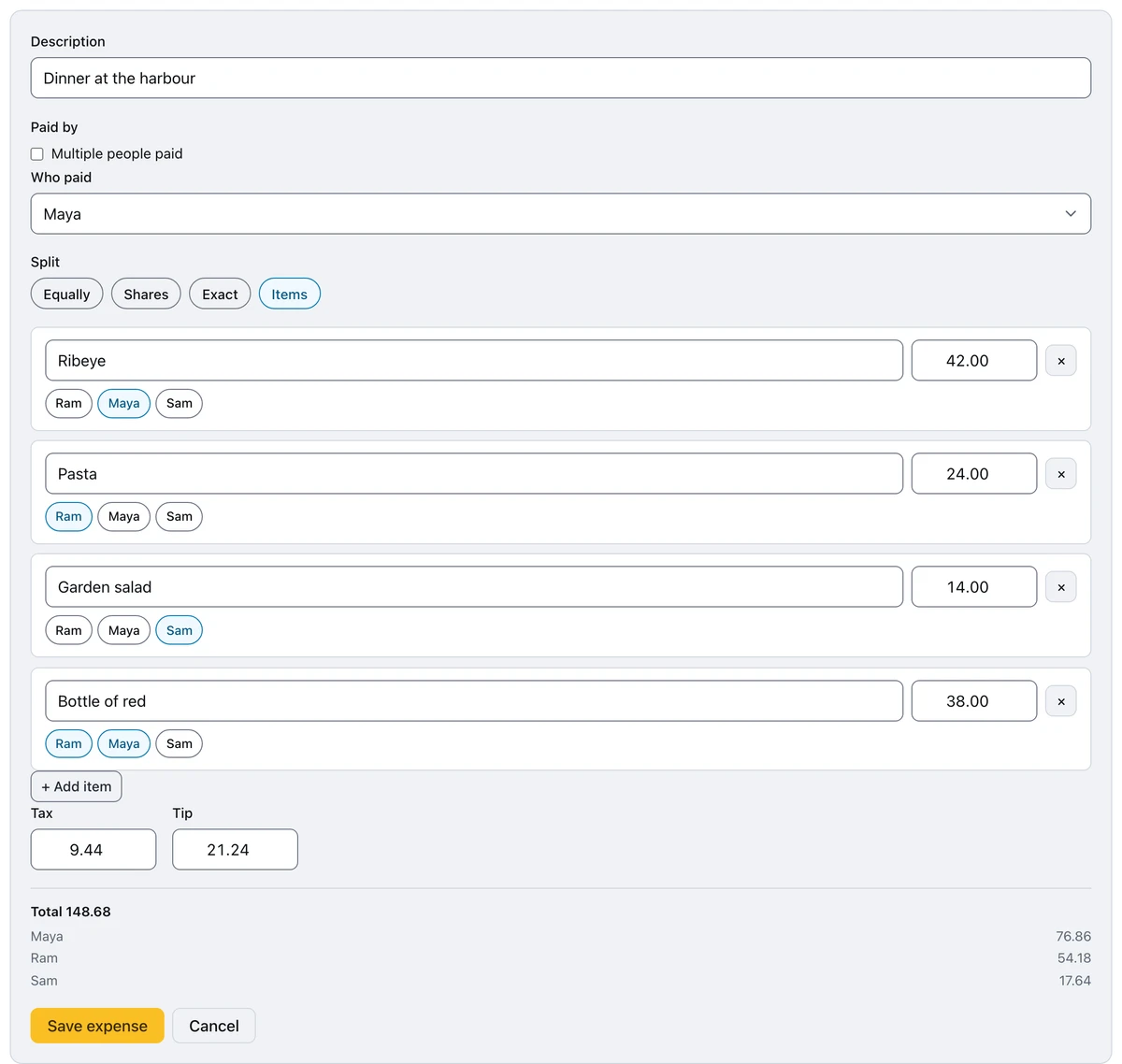
Each item tapped to whoever ate it. The preview at the bottom updates as you go.
Sam’s real share came out at $17.64 instead of $49.56. Maya, who ordered the steak and half the wine, paid $76.86. That single expense is most of the reason the final transfers look the way they do.
The quick split, for when you’re still at the table
The group ledger is for trips. For the check that just landed, there’s a Quick split mode that fits on a phone: bill, tip, tax, number of people.
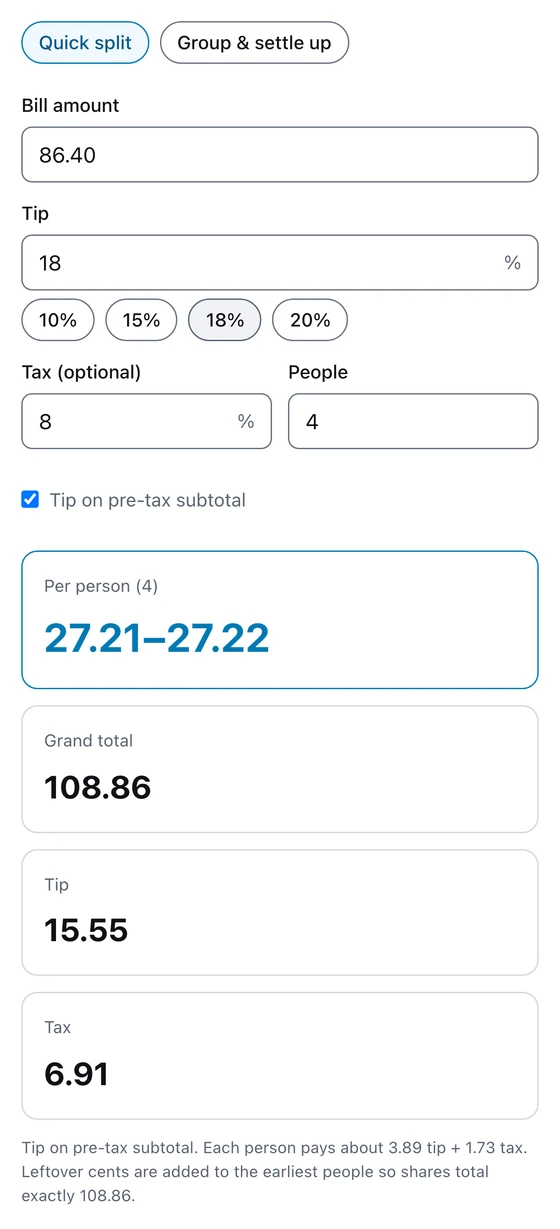
An $86.40 bill, 18% tip, 8% tax, four people, and an honest 27.21–27.22 instead of a rounded lie.
Look closely at the per-person figure: 27.21–27.22. Four people can’t split $108.86 evenly, so two of them pay a cent more. Everything is tracked in whole cents and the shares always add back to the exact total, which is why the settle-up on the trip balances to the penny instead of leaving a stray cent hanging.
When a free Splitwise alternative isn’t enough
I’d rather be useful than pretend there’s no reason people pay for the real thing.
Splitwise is a shared, synced ledger. Everyone installs it, everyone sees the same group, anyone can add an expense from their own phone, and it will quietly nag your friends about what they owe. For a flatshare with rent and bills running month after month, that’s genuinely the right shape, and a browser tab isn’t going to replace it.
What I built is the one-off version. There’s one ledger, on your device, and you’re the one keeping it. You add the expenses and send the summary. For a weekend or a group holiday that ends, that’s the whole job, and nobody else has to install or sign up for anything. Splitwise, Settle Up, and Tricount all do the recurring version well if that’s what you need.
What it can’t do
- One currency at a time. A trip that mixed euros and pounds has to be converted before the amounts go in, and the currency converter handles that part.
- The group lives in this browser. It’s saved locally rather than in an account, so it survives a refresh but not a switch to your laptop. The share link is the escape hatch. It carries the entire split and opens anywhere.
- It works out the transfers and stops there. No payment rails are attached. You still open your banking app.
- You’re the scorekeeper. Nobody else can add to the ledger from their phone. That’s the trade for nobody needing an account.
The whole ledger is computed in the tab, on your machine. The list of what your friends owe and what they ordered never goes to a server. If you just need a percentage in a hurry, the percentage calculator is next door.
Bill Splitter & Tip Calculator
A bill splitter for one check or a whole trip: tip, tax, who paid what, and the shortest list of transfers that squares everyone up.
Read next
 Office Workers
Scan documents to PDF free without installing an app
Scan documents to PDF free with your phone or laptop: auto edges, straightening, a clean-up eraser, searchable text. All in the browser, nothing installed or uploaded.
 Students
Transcribe audio to text free, on your device
Transcribe audio to text free in your browser: a lecture, a meeting, a voice memo. Timestamps, SRT and WebVTT export, and nothing leaves your device or asks for an account.
 Students
Extract text from a scanned PDF with a neural OCR engine
Extract text from a scanned PDF or a photo of a page, free. Choose Classic or the neural Sharp engine, then copy the words or take back a searchable PDF.